MTkeypad, square matrix
(digital reading)
Event management for Uno, Nano, Mega
An MTkeypad object manages a square matrix of buttons.
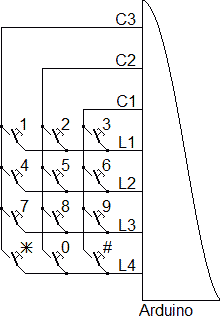
The buttons are on a grid of L rows and C columns, and we need L+C entries on the card. The matrix should be as square as possible (L and C equal to or different from 1). For example for 12 keys, a 4x3 matrix requires 7 pins, a 3x5 or 2x6 requires 8 pins and a 1x12 requires 13 pins.
| 6 bits | 7 bits | 8 bits | 9 bits | 10 bits | |
| maxi | 9 buttons | 12 buttons | 16 buttons | 20 buttons | 25 buttons |
The MTkeypad object can only read one key at a time. If multiple keys are pressed, it returns the key on the "lower row" and possibly the most "right", or even a key not pressed. This is due to the wiring itself. We can have up to 128 buttons (you need 15 pins!). It is not possible to use the keypad pins for other tasks because management is under interruption.
Advantages:
- interesting with 12 and 16 key keyboards already wired
- no additional components
Disadvantages:
- reading impossible if several keys are pressed
- other similar structures use fewer pins
Include to add
#include <MTobjects.h> // See http://arduino.dansetrad.fr/en/MTobjects
I strongly advise leaving the comment, if another person wanted to try the program, they would have a direct link download. This is valid for all the libraries you use.
Helpful comment
lines_on
columns_on
This comment is a word that can be added anywhere and which is ignored by the compiler.
Constructor
MTkeypad(PIN_LINES,
      PIN_COLUMNS,
      onSelectFunction = NO_ACTION,
      onUnselectFunction = NO_ACTION);
- PIN_LINES (const uint8_t[]): pins on which the matrix is connected, table containing the number of lines followed by the names of the pins
- PIN_COLUMNS (const uint8_t[]): pins on which the matrix is connected, table containing the number of columns followed by the pin names
- onSelectFunction: what happens when a button is pressed
- NO_ACTION → nothing happens
- function → calling a function "void function(int8_t key) {...}" The parameter passed is the number of the key.
- onUnselectFunction: what happens when you release the buttons
- NO_ACTION → nothing happens
- function: → calling a function "void function(void) {...}"
Useful functions
int8_t getKey(void);
virtual void onSelect(int8_t key);
virtual void onUnselect(void);
getKey: returns the number of the key pressed, -1 if none
onSelect: function to override called when the button is pressed
onUnselect: function to override called when the button is released
Bonus Features
void setOnSelectFunction(onSelectFunction);
void setOnSelectFunction();
void setOnUnselectFunction(onUnselectFunction);
void setOnUnselectFunction();
setOnSelectFunction: changes the function called when pressed
setOnSelectFunction: without parameters deletes the function called when pressed
setOnUnselectFunction: changes the function called on release
setOnUnselectFunction: without parameters removes the called function on release
Examples
- Example 1: Coded lock
- Example 2: Coded lock and reset
- Test 1: Simple test
- Test 2: Test and character
- Test 3: getKey test
- Test 4: setOnSelectFunction test
- Test 5: onSelect test