MTanalogButtons
(analog reading)
Event management for Uno, Nano, Mega
An MTanalogButtons object manages a set of buttons wired on a single analog pin and read using a table. We can read almost all assemblies, but the presence of a table can be annoying if the number of buttons is high. On a single pin analog, it is possible to read more than 100 buttons, and at the rate of one word per button, this consumes more than 200 bytes. To create the table, you also have to do the assembly and press all the buttons... and pray that it works.
To avoid having a table and consuming RAM, reading with extraction of the button number is interesting, but it is not still available in MTobjects. Certain montages having less interest, the objects of MTobjetcs will probably never exist. The reading without a table is not as efficient in terms of number of buttons.
To create the table, see if the quality is sufficient, and have a test program, I recommend using a Aapprenticeship program designed for MTanalogButtons.
Some assembly ideas
I cannot give all the usable montages, the pages on the buttons (in french, sorry) give more details, in particular on the calculation of the resistance values. In summary:
Voltage divider with parallel resistors
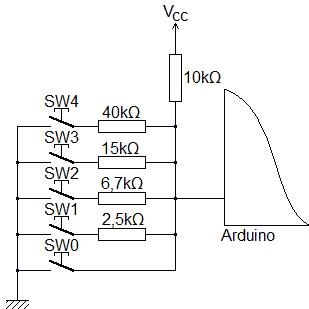
- all buttons have a common ground terminal
- you can use a pre-wired 4x1 matrix for example
- hardly usable if the buttons are far away
- the uncertainty on the resistance limits the number of switches
- mono reading
Voltage divider with series resistors

- no common or ground terminal
- if the buttons are spaced apart, you need 2 wires to go from one to the other
- even with resistances at 10% the assembly works
- this is the assembly that allows the greatest number of buttons
Current summator with poly reading
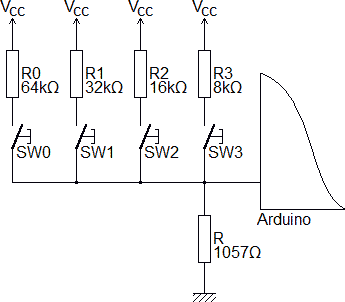
- common terminal but not ground
- you can use a pre-wired 4x1 matrix for example
- hardly usable if the buttons are far away
- allows poly reading
- resistance tolerances limit the number of buttons
- values that are multiples of 2 are problematic
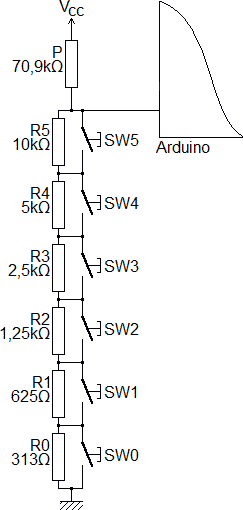
- allows poly reading
- if the buttons are spaced apart, only 1 thread is needed to go from one to the other
- resistance tolerances limit the number of buttons
- values that are multiples of 2 are problematic
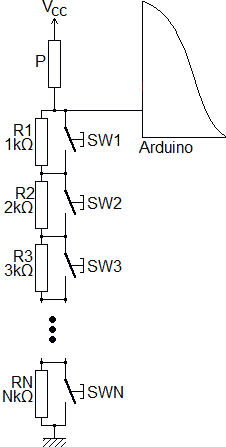
- if the buttons are spaced apart, only 1 thread is needed to go from one to the other
- multiple values of R1 is a problem
Keypad or square matrix with analog reading
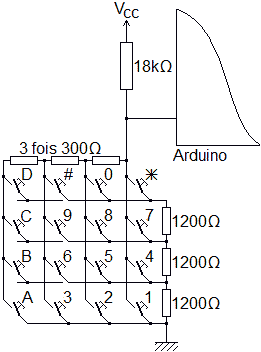
- you can use already wired matrices (keypad)
- this is the assembly which has the least resistance
- all buttons must be close
Include to add
#include <MTobjects.h> // See http://arduino.dansetrad.fr/en/MTobjects
I strongly advise leaving the comment, if another person wanted to try the program, they would have a direct link download. This is valid for all the libraries you use.
Constructor
MTanalogButtons(pin,
  THRESHOLDS,
  onSelectFunction = NO_ACTION,
  onUnselectFunction = NO_ACTION);
- pin (uint8_t): pin on which the set of buttons is connected
- THRESHOLDS (const word[]): table of thresholds (see below)
- onSelectFunction: what happens when a button is pressed
- NO_ACTION → nothing happens
- function → calling a function "void function(uint8_t key) {...}" The parameter passed is the number of the key.
- onUnselectFunction: what happens when you release the buttons
- NO_ACTION → nothing happens
- function: → calling a function "void function(void) {...}"
THRESHOLDS
Get inspired by:
const word THRESHOLDS_TABLE[] = {982, 920, 880, 840, 797, 754, 710, 665, 619, 571, 523, 471, 421, 369, 316, 260, 204, 145, 87, 28, 0}; // Values of comparison thresholds

MTanalogButtons Keypad(PIN, THRESHOLDS_TABLE);
Thresholds must be in a constant array of word and ordered:
- in ascending order if without pressing the buttons the converter gives a value close to 0, and ends with 1023
- in descending order (as above) if without pressing the buttons the converter gives a value close to 1023, and ends by 0.
The well-chosen ascending or descending order allows you to spend less time if no button is pressed (most often).
If for button n°N the converter gives between 96 and 100 and for button n°N+1 it gives between 140 and 143, the threshold to use is the middle of (100, 140) or 120. As it is a bit tedious I advise using the learning program.
conversion error
When reading the analog-to-digital converter, it is possible that a button has just been pressed or released and the value is not still
stable at the time of reading. We can also have noise which distorts the measurement. To avoid this, a value is not taken into account only
if we read the same value twice except for one error:
- if error=0 (default) the same value must be read twice in a row. This eliminates quite a few false readings
- if error=10 if the converter gives 523 then 533 (or any value in [513, 533]), we will consider that it is the same
- with error=0 we could theoretically read 500 buttons, but with error=10, we could only have 100 buttons
- if error is too big, we will read one button for another.
The smaller the error, the more we avoid a reading error. But if the system is very noisy, we risk never taking take into account the
button. Leave the default value, and increase this number.
Useful functions
byte getKey(void);
virtual void onSelect(uint8_t key);
virtual void onUnselect(void);
void setError(word error = 0);
word getError(void);
getKey: returns the number of the key pressed, 0 if none
onSelect: function to override called when a button is pressed
onUnselect: function to override called when all buttons are released
setError: allows you to set the reading tolerance (acceptable error)
setError: reads reading tolerance (acceptable error)
Bonus functions
void setOnSelectFunction(onSelectFunction);
void setOnSelectFunction();
void setOnUnselectFunction(onUnselectFunction);
void setOnUnselectFunction();
setOnSelectFunction: changes the function called when pressed
setOnSelectFunction: without parameters deletes the function called when pressed
setOnUnselectFunction: changes the function called on release
setOnUnselectFunction: without parameters removes the called function on release
Examples
- Apprenticeship (creation of the threshold table)
- Example 1: Result
- Example 2: Coded lock
- Example 3: Traditional program
- Test 1: With 2 analog pins
- Test 2: Number or character
- Test 3: getKey
- Test 4: onSelectFunction
- Test 5: onSelect